I like to keep a log of every movie I watch (what can I tell you, I’m a fun guy). Until recently Pathe would email you an iCal file with everything you needed. Since the app rewrite last year, they’ve stopped doing that. Now they share a Google calendar link. Yeah, we’re not doing that. So I needed a way to add movie visits to my calendar.
movie-planner-web is the
answer: a browser app that reads and writes your own CalDAV calendar, so a
viewing is a form, not a script. There’s a live
copy to try. Its companion,
movie-planner, is a CLI for the
cases where a terminal is the better tool: piping in a booking email, bulk
imports, a cron job. Both read and write the same JSON, so a file either one
writes is one the other can read back.
What the web app does #
Point it at a Baikal (CalDAV) calendar and you can browse, log, edit and delete viewings from any browser. Enter an IMDb ID or just the title, and it pulls IMDb, Rotten Tomatoes and Metacritic ratings from OMDb, and, with an optional TMDb key, a fuller cast list, the trailer, the collection a film belongs to and its content certification on top. Log the same film twice on the same day by mistake and fuzzy title matching catches it before it becomes a duplicate calendar event.
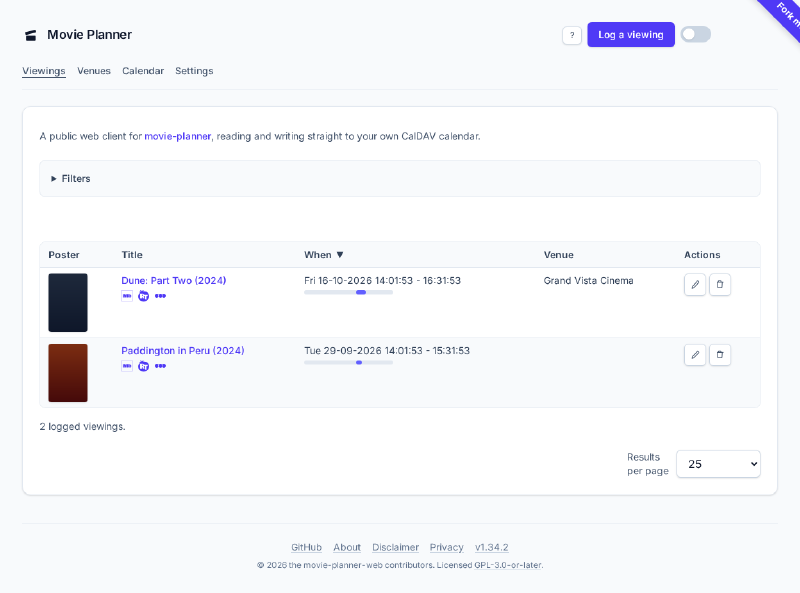
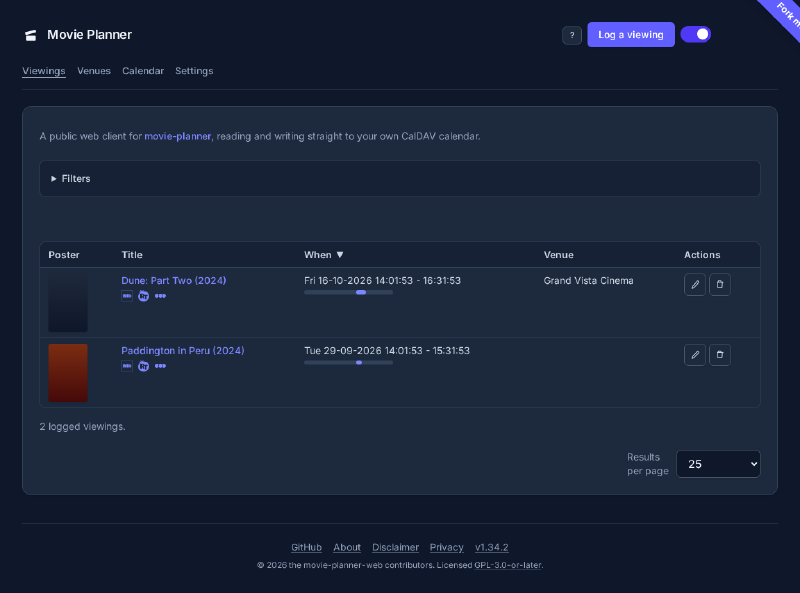
Around that core sit a details page per viewing, venue management with autocomplete, a calendar heatmap that marks the days you went to the cinema, vim-style keyboard navigation, a dark mode toggle, and a cached first paint that refreshes in the background. You can import a Letterboxd or IMDb export, with progress shown and a wait when OMDb rate-limits you. There are also optional WebMCP tools for log, edit, search and import, for a compatible in-browser agent.
A server it doesn’t have #
The real decision is what it leaves out. It started with a server-side proxy in
front of CalDAV and OMDb, same as most apps that talk to a third-party API from
a browser. A few pull requests later that proxy came out entirely
(refactor(caldav): remove the server-side CalDAV/OMDb proxy), and the build
went fully static. Your browser talks straight to your CalDAV server, and
straight to OMDb and TMDb for ratings and posters. Nothing in between ever sees
your credentials, not even in transit. src/lib/credentials/store.ts is the
only place they’re held, in the visitor’s own browser storage, and the
CalDAV/OMDb/TMDb clients are the only places they’re ever sent anywhere. The
live copy holds nothing of yours.
Because the browser talks to your CalDAV server directly, that server has to say
so out loud: it needs to send CORS headers allowing the app’s origin, which most
CalDAV servers, Baikal included, don’t do by default. The README has working
examples for Caddy, nginx and Traefik in front of Baikal, plus two
nginx-specific gotchas that only show up against a real deployment. A preflight
OPTIONS request that reaches sabre/dav instead of being answered by the proxy
fails before your credentials are ever checked, and add_header without
always quietly stops applying to any response that isn’t a 2xx or 3xx.
How it grew #
One narrow pull request at a time. Credential capture and storage first, then
the seven CalDAV operations as real WebDAV calls, then the calendar overview,
then the log form with OMDb enrichment, then editing and deleting, then CSV and
JSON bulk import with the same duplicate detection. A Tailwind redesign came
later, and the heavier screens moved from server-rendered Astro to Svelte
islands. Parsing Pathé booking emails did not make the trip: it was in the web
app for a while, then came out again, since the CLI’s from-pathe-email and the
standalone pathe-mail-import (which reads a mailbox and writes a file the
import accepts) already cover it.
The CLI, for the rest #
movie-planner started first, as the thing that replaced the old iCal file, and
it’s still the better tool when you’re already in a terminal. movie-planner log prompts for the fields that matter and pushes the entry to the calendar the
moment it’s saved, with the same OMDb and TMDb enrichment and the same fuzzy
duplicate check. Every calendar event carries real content in its description:
whatever ratings and Letterboxd link the entry has, plus, for a Pathé booking,
the screening format and seat. An init command writes a starter config.toml
so nobody has to hand-author the CalDAV URL, OMDb key and database path.
Straight from the booking email #
Every Pathé viewing starts as a booking confirmation email with the title, date,
times, cinema and a booking number already in it, so typing that back in by hand
is pure transcription. from-pathe-email takes the email instead, piped in or as
a saved file:
cat ticket.eml | movie-planner from-pathe-email
movie-planner from-pathe-email ticket.eml
It parses the booking, shows what it found, and asks for confirmation before
writing. Piping the email doesn’t skip that prompt: stdin is occupied by the
email itself, so the confirmation is read from the controlling terminal. A
re-sent confirmation for a booking already logged (same booking number, after a
reschedule) updates that entry rather than creating a second one. --yes skips
the prompt for a mail-pipe automation with no terminal attached, and
--no-metadata skips the OMDb lookup.
Getting history in and out #
A log you can’t move is a trap. import takes a Letterboxd diary.csv or an
IMDb ratings.csv with --medium to say where you watched them, alongside the
CSV and JSON it always read. export writes the JSON shape the web client
imports. list filters on what OMDb stored, not just dates: title, venue,
director, actor, genre, year and rating class.
movie-planner import diary.csv --medium netflix
movie-planner export --from 2026-01-01 --medium cinema -o 2026.json
movie-planner list --director "Denis Villeneuve" --year 2024
Venues can be edited with locations venues edit, which sets an address, chain
and coordinates; the calendar events there pick up the new location straight
away. Sync is push-only by design, with one deliberate exception: sync pull
reads the calendar back and offers each new, changed or removed event one at a
time, nothing written without a yes. It exists for the day you edit something
through the web app. sync refresh backfills ratings for older entries and
re-pushes every calendar event, and purge deletes every calendar event for
starting over. A request OMDb refused is different from a title it doesn’t know,
and a title it answered without completing is left out of sync refresh rather
than asked about again on every sweep.
Real data, caught and removed #
The CLI’s import originally read org-mode files too, since that’s what the tool
was replacing, and it was built and smoke-tested against a real personal viewing
history baked into the test fixtures: real titles, real venues, real dates.
That’s a bad thing to ship in a public repo. It came out in two passes.
parse_org and its orgparse dependency were dropped, since CSV and JSON cover
the same need without depending on one person’s log format, and every real
title, venue and date across the test suite was replaced with fictional ones. The
fuzzy-match threshold test needed re-verifying against the new strings rather
than a find-and-replace, since its whole point is the specific edit distance
between two titles.
Removing it from the working tree is different from removing it from history. A
git filter-repo pass scrubbed the real data out of the already-merged commits
too, the same mechanism an earlier pass had used to purge a real name and email
addresses from the log. Two leaks, two purges, both caught before the repo went
public.
Packaging and installing #
I run Arch and NixOS, so the AUR package and the Nix flake are for me, but I
wanted it usable on Debian and RPM-based distros too. That’s .deb and .rpm
packages via nfpm, a Docker image published to GHCR on every release, and
build provenance attestation so a downloaded package can be verified against the
exact commit that produced it. Pick whichever fits;
docs/INSTALL.md
has the configuration detail.
Arch Linux, from the AUR:
paru -S movie-plannerDebian/Ubuntu and Fedora/RHEL, from the latest release:
# Debian/Ubuntu
sudo dpkg -i movie-planner_VERSION_amd64.deb

# Fedora/RHEL
sudo rpm -i movie-planner-VERSION-1.x86_64.rpmdocker run --rm -it --user "$(id -u):$(id -g)" -e HOME=/home/movieplanner \
--cap-drop=ALL --security-opt=no-new-privileges --read-only \
--tmpfs /tmp --memory=256m --cpus=1 \
-v ~/.config/movie-planner:/home/movieplanner/.config/movie-planner \
-v ~/.local/share/movie-planner:/home/movieplanner/.local/share/movie-planner \
ghcr.io/alrayyes/movie-planner:latest --helpNix and NixOS:
nix run github:alrayyes/movie-planner       # try it
nix profile install github:alrayyes/movie-planner # keep itpipx, or anywhere none of the above fits:
pipx install git+https://github.com/alrayyes/movie-planner.gitNot published to PyPI, so installing straight from the repo is the answer there.
pip install works the same way in place of pipx if you’d rather manage the
virtual environment yourself.
Getting either one #
The web client’s repository covers the CORS setup and the optional OMDb and TMDb keys. The CLI’s repository has the config file layout and every command’s options. If you use either and find, or don’t find, them useful, let me know what you think.